

Webhooks
Webhooks let TronDesigner notify your server as soon as something happens — a print job is created or updated, a logo is uploaded, a proofreading or print data PDF is generated — so your backend can react without polling the REST API.
Webhooks are part of the Webhooks license feature. You configure them in the Admin Portal under Settings → Webhooks.
How delivery works
For every event that matches an endpoint's subscriptions, TronDesigner creates a delivery and sends the first attempt: an HTTP POST with a JSON body to your URL. A 2xx response marks the delivery as successful. Any other status, a timeout or a connection error counts as a failed attempt, and the delivery is retried until the endpoint's maximum number of attempts is reached; then it's moved to Dead Letter. After the n-th failed attempt the next one is scheduled 30 s × 2^n later (1 min, 2 min, 4 min, … — about 2 hours before the 8th attempt with the default settings); the queue is checked every 20 seconds, so attempts can start a little later. A timeout is logged as 408 and a connection error as 503.
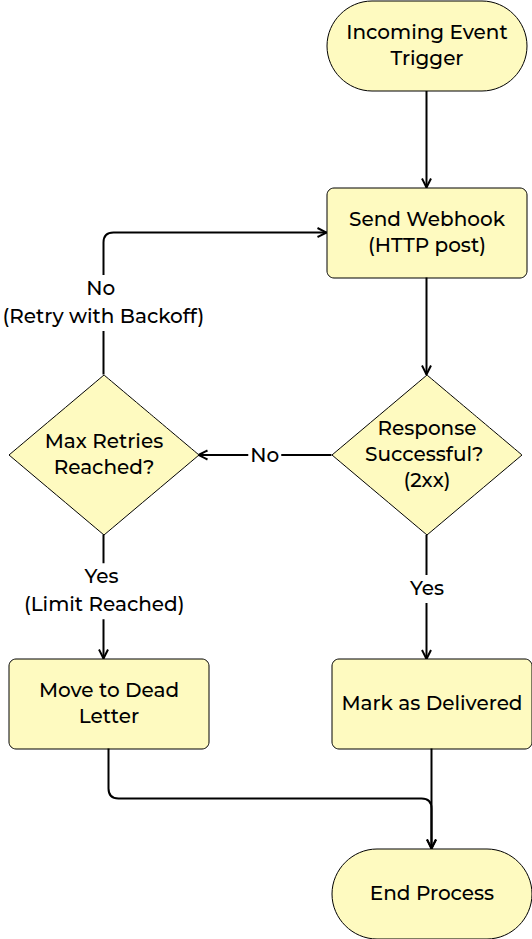
Your server doesn't need to return anything in the body. TronDesigner doesn't parse your response — it stores the status code, headers and a truncated body in the delivery log.
Set up an endpoint
Open Settings → Webhooks in the Admin Portal and create a webhook endpoint.
URL — a complete
http://orhttps://address (up to 1,000 characters), for examplehttps://shop.example.com/webhooks/trondesigner. Use HTTPS in production.Event subscriptions — pick one or more events:
Event Sent when logo.createdA new logo is stored: a successful upload (in the editor or via the REST API, but not a file that already existed and not a failed upload), or the result of an edit such as a recolor (including POST /api/logos/{logoGuid}/recolor), crop, background removal or vectorization. Edit results are usually Hidden logos.print_job.createdA new print job is saved. print_job.updatedAn existing print job changes (content, state, customer or order data). proofreading.createdA proofreading PDF is generated (in the editor or via the REST API). print_data.createdPrint data is generated. Custom headers (optional) — key/value pairs sent with every request, for example an extra token your gateway expects. They're sent in addition to the standard headers below.
Security — the endpoint's secret, used to sign every request. Generate one (32 random characters) or enter your own, and copy it before you save: afterwards it's no longer fully visible.
Delivery options — Timeout 2–60 seconds (default 20) and Max attempts 1–10 (default 8).
Keep Enable switched on. You can disable an endpoint later without deleting it.
What TronDesigner sends
Headers
| Header | Content |
|---|---|
User-Agent | PromoTron-Webhooks/1.0 |
X-Webhook-Event | GUID of the event. It's the same for all deliveries and attempts of one event. It is not the event name (print_job.created, …). |
X-Webhook-Id | A new GUID for every attempt, used as {eventId} in the signature (see below). Don't deduplicate on it. |
X-Webhook-Delivery | ID of the delivery (shown as Delivery ID in the Admin Portal). The same for all attempts and resends of the delivery. |
X-Webhook-Attempt | Attempt number, starting at 1. A manual resend continues the count. |
X-Webhook-Timestamp | Unix time in seconds when the request was signed. |
X-Webhook-Signature | Signature made with the current secret. |
X-Webhook-Signature-Prev | Signature made with the previous secret — only while a rotated secret is still valid. |
NOTE
The event name isn't sent. Neither the headers nor the body say which event a request belongs to. The payload shape tells the resource apart (print job, logo, proofreading, print data), but print_job.created and print_job.updated look the same. If you need to tell them apart, create one endpoint per event; otherwise treat both as "upsert this print job".
Body
The body is the JSON representation of the resource that changed (no envelope), with PascalCase property names and enum values as strings. Every payload carries the PrintJobGuid (or the LogoGuid for logo.created) that you need for follow-up REST calls.
Example: proofreading.created
{
  "PrintJobGuid": "76b2be59-6403-4f89-9c9a-3a64588c05d3",
  "OutputGuid": "435b29be-3841-44e3-80c6-6d5adc74456e",
  "Format": "PDF",
  "Created": "2025-12-16T15:21:14.0672675+00:00"
}
OutputGuid is the proofreading GUID: download the file with GET /api/print-jobs/{PrintJobGuid}/proofreading/{OutputGuid}.
Example: print_data.created
{
  "PrintJobGuid": "76b2be59-6403-4f89-9c9a-3a64588c05d3",
  "PrintingGuid": "5f60a5a1-4575-481a-90ad-7b0b11203aa8",
  "OutputGuid": "d1d16895-5c8f-485b-b444-d27bf362b920",
  "Created": "2025-12-16T15:21:19.950551+00:00",
  "PositionCodePtn": "front",
  "PositionCodeDisplay": "front",
  "TechnologyCodePtn": "PAD04",
  "TechnologyCodeDisplay": "PAD04",
  "PrintDataOptions": { "FileFormat": "PDF", "ShowPrintArea": true, "PageSize": "A4", "PageMargins": 0 }
}
WARNING
Known issue: print data generated for the whole print job (POST /api/print-jobs/{printJobGuid}/print-data) currently sends no print_data.created webhook. Only print data of a single printing is delivered.
Example: print_job.created / print_job.updated (shortened)
{
  "PrintJobGuid": "76b2be59-6403-4f89-9c9a-3a64588c05d3",
  "Supplier": "…", "SupplierName": "…",
  "Customer": {
    "CustomerGUID": "a70b77d6-f649-4d1d-8553-fbf150f45dc1",
    "CustomerEmail": "user@example.com",
    "CustomerIdentity": "user-42",
    "OrderCode": "ORDER-1001",
    "OrderItemCode": "1"
  },
  "Title": "…", "Code": "PJ00000069",
  "Created": "2025-12-16T15:20:01+00:00", "Updated": null,
  "LanguageCode": "en", "State": "PrepareNew",
  "ProductCodeShow": "100860", "ProductTitle": "…", "ProductVariantsCount": 1,
  "Printings": [{
    "PrintingGuid": "5f60a5a1-4575-481a-90ad-7b0b11203aa8",
    "PositionCodeDisplay": "front", "PositionName": "Front",
    "TechnologyCodeDisplay": "PAD04", "TechnologyName": "Pad print",
    "MotiveImage": "…", "MotiveImageFormat": "PNG"
  }]
}
The print job payload is a summary: custom properties, variants and printing details aren't included.
Example: logo.created
{
  "LogoGuid": "7fa15b7b-e809-461c-b976-1fedba0004a0",
  "Filename": "logo.png",
  "Name": "logo.png",
  "Type": "RASTER",
  "Colors": {
    "IsFullColor": false,
    "ColorList": [{ "MapHex": "#E30613FF", "PmsName": "PANTONE 485 C", "CmykHex": "#00FF8A00", "RgbHex": "#DA291CFF", "Source": "RGB" }],
    "ShouldUseDarkBackground": false
  },
  "FilesDescription": {
    "OriginalFormat": "PNG", "Original": "ORIGINAL_ORIGINAL.png",
    "ConvertedFormat": "PNG", "Converted": "CONVERTED_ORIGINAL.png", "ConvertedWhite": null, "ConvertedBlack": null,
    "PreviewFormat": "PNG", "Preview": "PREVIEW_ORIGINAL.png", "PreviewWhite": null, "PreviewBlack": null
  },
  "Size": { "Unit": "PIXELS", "Width": 1200, "Height": 800 },
  "Properties": [{ "ClassPath": "HasTransparency", "Value": "True" }]
}
This is the logo list item shape, not the detail of GET /api/logos/{logoGuid}: it has no State, Customer, OriginalLogoGuid or PreviousLogoGuid, and FilesDescription holds internal file names rather than download links. To tell your own REST uploads from logos created in the editor or by edits, match LogoGuid with the logoGuid returned by the upload; fetch the detail from the REST API when you need the state or the parent logo. The order of properties isn't guaranteed.
Treat the payload as a notification: for anything beyond the GUIDs, fetch the current state from the REST API (for example GET /api/print-jobs/{PrintJobGuid}).
Verify the signature
Each request is signed with HMAC-SHA256. The signed string combines the timestamp, the X-Webhook-Id value and a SHA-256 hash of the raw body:
v1:{X-Webhook-Timestamp}:{X-Webhook-Id}:{hex(sha256(raw body))}The signature header holds comma-separated parts; the lowercase hex HMAC is the part that starts with sig=. To verify a request:
- Read the raw request body. Don't parse and re-serialize the JSON first — any change breaks the hash.
- Reject the request if
X-Webhook-Timestampis more than a few minutes away from your clock (replay protection). - Compute
HMAC-SHA256(secret, signing string)and compare it withsig=fromX-Webhook-Signaturein constant time. - During secret rotation, also accept
X-Webhook-Signature-Prevchecked with your previous secret. - Answer
401if verification fails and2xxif it succeeds.
// Express: npm install express
const express = require('express');
const crypto = require('crypto');

const SECRET = process.env.TD_WEBHOOK_SECRET; // current secret
const PREV_SECRET = process.env.TD_WEBHOOK_SECRET_PREV; // previous secret, only during rotation
const TOLERANCE_SECONDS = 5 * 60;

function signatureFrom(header) {
  const part = (header || '').split(',').map((p) => p.trim()).find((p) => p.startsWith('sig='));
  return part ? part.slice(4) : '';
}

function matches(header, secret, signingString) {
  if (!header || !secret) return false;
  const received = Buffer.from(signatureFrom(header), 'hex');
  const expected = crypto.createHmac('sha256', secret).update(signingString, 'utf8').digest();
  return received.length === expected.length && crypto.timingSafeEqual(received, expected);
}

function verify(rawBody, headers) {
  const timestamp = Number.parseInt(headers['x-webhook-timestamp'], 10);
  if (!Number.isFinite(timestamp) || Math.abs(Date.now() / 1000 - timestamp) > TOLERANCE_SECONDS) return false;
  const payloadHash = crypto.createHash('sha256').update(rawBody).digest('hex');
  const signingString = `v1:${timestamp}:${headers['x-webhook-id']}:${payloadHash}`;
  return matches(headers['x-webhook-signature'], SECRET, signingString)
    || matches(headers['x-webhook-signature-prev'], PREV_SECRET, signingString);
}

const app = express();
app.post('/webhooks/trondesigner', express.raw({ type: '*/*' }), (req, res) => {
  if (!verify(req.body, req.headers)) return res.status(401).end();
  const deliveryId = req.headers['x-webhook-delivery']; // deduplicate on this
  const payload = JSON.parse(req.body.toString('utf8'));
  // Store or enqueue (deliveryId, payload) and return quickly; do the real work in the background.
  return res.status(204).end();
});
app.listen(3000);<?php
// PHP 8+
const TOLERANCE_SECONDS = 300;
function td_signature_from(?string $header): string
{
foreach (explode(',', $header ?? '') as $part) {
$part = trim($part);
if (str_starts_with($part, 'sig=')) {
return substr($part, 4);
}
}
return '';
}
function td_verify(string $payload, array $headers, string $secret, string $prevSecret): bool
{
$headers = array_change_key_case($headers, CASE_LOWER);
$timestamp = $headers['x-webhook-timestamp'] ?? '';
if (!ctype_digit($timestamp) || abs(time() - (int) $timestamp) > TOLERANCE_SECONDS) {
return false;
}
$signingString = 'v1:' . $timestamp . ':' . ($headers['x-webhook-id'] ?? '') . ':' . hash('sha256', $payload);
$matches = fn (?string $header, string $key): bool => $header !== null && $key !== ''
&& hash_equals(hash_hmac('sha256', $signingString, $key), td_signature_from($header));
return $matches($headers['x-webhook-signature'] ?? null, $secret)
|| $matches($headers['x-webhook-signature-prev'] ?? null, $prevSecret);
}
$payload = file_get_contents('php://input');
$secret = (string) getenv('TD_WEBHOOK_SECRET');
$prevSecret = (string) getenv('TD_WEBHOOK_SECRET_PREV'); // empty unless you're rotating
if (!td_verify($payload, getallheaders(), $secret, $prevSecret)) {
http_response_code(401);
exit;
}
$deliveryId = $_SERVER['HTTP_X_WEBHOOK_DELIVERY'] ?? ''; // deduplicate on this
$data = json_decode($payload, true);
// Store or enqueue ($deliveryId, $data) and return quickly.
http_response_code(204);// ASP.NET Core minimal API (.NET 8)
using System.Security.Cryptography;
using System.Text;
var builder = WebApplication.CreateBuilder(args);
var app = builder.Build();
var secret = builder.Configuration["TronDesigner:WebhookSecret"];
var prevSecret = builder.Configuration["TronDesigner:WebhookSecretPrev"]; // only during rotation
app.MapPost("/webhooks/trondesigner", async (HttpRequest request) =>
{
using var buffer = new MemoryStream();
await request.Body.CopyToAsync(buffer);
var payload = buffer.ToArray(); // raw bytes, exactly as received
if (!WebhookSignature.Verify(payload, request.Headers, secret, prevSecret))
return Results.Unauthorized();
var deliveryId = request.Headers["X-Webhook-Delivery"].ToString(); // deduplicate on this
// Store or enqueue (deliveryId, payload) and return quickly.
return Results.NoContent();
});
app.Run();
static class WebhookSignature
{
private static readonly TimeSpan Tolerance = TimeSpan.FromMinutes(5);
public static bool Verify(byte[] payload, IHeaderDictionary headers, string? secret, string? prevSecret)
{
if (!long.TryParse(headers["X-Webhook-Timestamp"], out var timestamp)) return false;
var age = DateTimeOffset.UtcNow - DateTimeOffset.FromUnixTimeSeconds(timestamp);
if (age.Duration() > Tolerance) return false;
var payloadHash = Convert.ToHexString(SHA256.HashData(payload)).ToLowerInvariant();
var signingString = Encoding.UTF8.GetBytes($"v1:{timestamp}:{headers["X-Webhook-Id"]}:{payloadHash}");
return Matches(headers["X-Webhook-Signature"], secret, signingString)
|| Matches(headers["X-Webhook-Signature-Prev"], prevSecret, signingString);
}
private static bool Matches(string? header, string? secret, byte[] signingString)
{
if (string.IsNullOrEmpty(header) || string.IsNullOrEmpty(secret)) return false;
var received = header.Split(',', StringSplitOptions.TrimEntries)
.FirstOrDefault(p => p.StartsWith("sig="))?[4..];
if (received is null) return false;
var expected = HMACSHA256.HashData(Encoding.UTF8.GetBytes(secret), signingString);
try
{
return CryptographicOperations.FixedTimeEquals(Convert.FromHexString(received), expected);
}
catch (FormatException)
{
return false;
}
}
}Rotate the secret
Rotate the secret regularly and whenever it might have leaked:
- Edit the endpoint, open Rotate Secret in the Security section and choose Generate New Secret.
- The new secret is used for signing immediately. The old one becomes the previous secret and stays valid until the Overlap until date (10 days ahead by default; you can change it).
- While the overlap lasts, requests carry both
X-Webhook-Signature(new secret) andX-Webhook-Signature-Prev(previous secret). Deploy the new secret to your server as the current one and keep the old one as the previous one. - After the overlap date, remove the previous secret from your configuration.
Handle retries and duplicates
- Respond fast. Verify, store the event, return
2xx, and process it asynchronously. A slow handler hits the endpoint timeout and triggers a retry even if your code eventually succeeds. - Be idempotent. The same event can arrive more than once (retries, manual resends). Deduplicate on
X-Webhook-Delivery, and make the processing itself safe to repeat — for example upsert byPrintJobGuid(orLogoGuid) instead of inserting. Rarely the same change is published twice and arrives with a newX-Webhook-Delivery, so the upsert is what really protects you. - Don't rely on order.
print_job.updatedcan arrive before you've finished processingprint_job.created. Fetch the current print job from the REST API when order matters. - Only 2xx is success. Any other status counts as a failed attempt and is retried — return
2xxalso for events you decide to ignore.
Monitor deliveries
Open an endpoint in Settings → Webhooks to see its deliveries with status (Pending, Success, Retrying or Dead Letter), attempt count, last attempt and next attempt time. Expand a delivery to list its attempts (time, response code, latency, error message); the attempt detail shows the request headers and body and your server's response, both truncated.
Each attempt also has a Resend action: after fixing your endpoint, send a failed delivery again. It needs the permission to change settings (TronDesigner.Settings.Update); users who can only view settings see the deliveries but not the action.
A resend is a new attempt of the same delivery: it gets a fresh X-Webhook-Timestamp, X-Webhook-Id and signature (so it passes the timestamp check), keeps X-Webhook-Delivery, and updates the delivery status: Success, or Dead Letter if it fails again — a resend is not retried automatically.
See also
- REST API — fetch print jobs, logos, proofreadings and print data after a webhook
- Integration recipes — server-side follow-up via webhook and REST
- Events and callbacks — the browser-side equivalents of these events